
AutoZone Auto Parts & Repair
AutoZone, Inc.Auto & Vehicles
4.714.54K Reviews
- Version
- 26.9.0
- Installs
- 5.00M
- Age Rating
- Everyone
Screenshots
Our Review of AutoZone Auto Parts & Repair
 Analysis by Appyee
I think of AutoZone Auto Parts & Repair as most useful when I have a specific car-related task in mind: identify a part, check where to look for it, or get oriented before attempting a repair. It is a free Auto & Vehicles app from AutoZone, Inc., and its focus on the retailer’s own parts and stores makes it different from a general car-maintenance tracker. That focus is helpful when I want to shop through AutoZone, but it also means it is not a complete substitute for a mechanic, a repair manual, or a broad comparison-shopping tool.
What free access means in practice
The app is free to download, so I can use it as a starting point without paying an upfront app price. That is a clear benefit for occasional needs, such as checking for a replacement filter or finding a nearby store. The cost of any parts is a separate purchase decision; free access to the app does not make the products free, and I would compare the part’s price and suitability before ordering.
AutoZone Auto Parts & Repair has a 4.7 average from around 117,000 ratings, and it has been installed over five million times. Those figures suggest that many people use it, though they do not tell me whether a specific item will fit my vehicle or be available at a particular location. I treat the app as a convenient shopping and planning tool, then verify the details that matter for my repair before committing.
Where the app earns its place
The strongest value here is the connection between finding a part and acting on that search. A generic web search may lead to scattered listings, while a visit to a store requires me to travel before I know what is available. This app brings AutoZone’s shopping and local-store discovery into one place, which can save a trip when I am trying to handle a straightforward maintenance job.
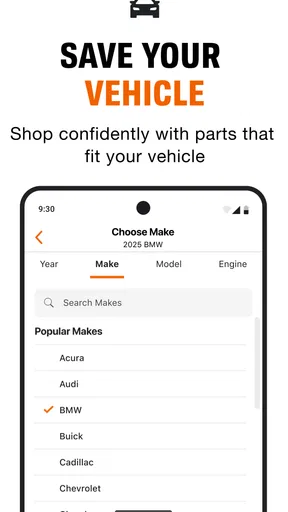
For example, if a wiper blade needs replacing before a rainy commute, I can look up options, narrow the search to my vehicle, and check a local store rather than guessing in the aisle. Keeping the vehicle information accurate is a small but important habit: a part that looks right by name may still be the wrong fit. I would also compare product details instead of choosing the first result automatically.
What to keep in mind
The retailer-centered approach is also the main trade-off. If I want to compare prices across several sellers, learn about a repair from independent sources, or keep a detailed maintenance history for multiple vehicles, a dedicated comparison site, repair reference, or vehicle logbook may suit me better. AutoZone’s app is most convincing when I am already comfortable shopping with AutoZone and want its parts and store options close at hand.
Repair guidance can help me understand a job, but reading or watching instructions is not the same as having the right tools or experience. I would use a guide to prepare and judge whether a task is within my ability, not as a reason to attempt a safety-critical repair without proper knowledge. Brakes, steering, and other essential systems deserve particular care; if I am unsure, a qualified mechanic is the sensible choice.
Who is likely to benefit
I would recommend trying it if you do basic maintenance yourself, often need replacement parts, or want to check a nearby AutoZone before making a trip. It can also be useful for a driver who does not do repairs but wants to identify a likely part and arrive at a store better prepared. The app is rated for Everyone, which makes it broadly suitable as a shopping tool, although children obviously should not use repair instructions as a substitute for adult supervision.
On the other hand, I would skip it if you do not expect to shop at AutoZone or if your main goal is independent technical advice and broad retailer comparisons. Its usefulness depends on whether the store’s products and locations match how you prefer to buy. The current version is 26.1.0, and the app has been available since Aug 2, 2010; those details give context, but my decision would still come down to whether its shopping workflow fits my needs.
A practical way to use it
When I am preparing for a repair, I would first confirm the vehicle details, search for the part by name, and review the options rather than relying on a vague description. Next, I would check the local-store information before setting out, especially if the repair is time-sensitive. If I am buying several items for one job, I would make a short checklist outside the search results so I do not confuse similar parts or forget a small necessity such as a replacement fastener.
That workflow is more useful than opening the app only after reaching the store. It gives me a chance to catch a mismatch or reconsider whether I have the skills and tools for the job. For a less urgent repair, I would take time to compare the app’s options with other sources; for an urgent, familiar replacement, local availability may matter more than finding the lowest price elsewhere.
One question a first-time user may have is whether the app is only for experienced DIYers. I do not think so: browsing parts and locating a store can help any driver, while repair guidance is there for people who want to learn. Another practical question is whether it replaces a mechanic. It does not; it can help with research and shopping, but diagnosis and safe completion of complex work still call for suitable expertise.
Another point worth considering is what to do when a search produces several plausible choices. I would slow down and check compatibility and product descriptions rather than treating a familiar name as proof of fit. If I cannot confidently identify the required part, I would ask for help at the store or consult a trusted repair professional before buying. This extra step is less convenient than an instant answer, but it is better than purchasing an incorrect component and losing time on the job.
Using the app for parts, repair planning, and store visits
Hey there, car enthusiasts and casual drivers alike! So, I recently got my hands on the AutoZone Auto Parts & Repair app, and I’ve got to say, it’s like having a mini AutoZone store right in my pocket. If you’re like me and love to tinker with your car or just need a reliable source for auto parts and advice, stick around as I take you through my experience with this nifty little app.
Getting Started with the App
First off, downloading the app is a breeze. Available on both Android and iOS, it took me just a couple of minutes to install and set up. Once you open it, you’re greeted with a clean and intuitive interface. I appreciate how AutoZone Auto Parts & Repair doesn’t bombard you with too much information at once. It’s all neatly organized, making navigation a walk in the park.
User Interface and Navigation
The main screen offers several categories: Parts, Repair Help, and Store Locator, among others. Each section is clearly marked, and the search function is prominently displayed at the top. Trust me, you’ll be using that search bar a lot if you’re hunting for specific parts. I found the interface pretty responsive, with minimal lag, which is always a plus when you’re in a hurry to find something.
Finding the Right Parts
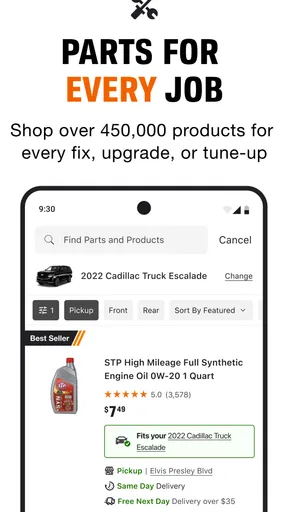
This is where the app truly shines. Whether you’re looking for brake pads, oil filters, or those pesky windshield wipers, AutoZone has got you covered. I was impressed by the vast selection available. Just type in what you need, and bam! You’ve got a list of options to choose from. The app also allows you to filter results based on your car’s make and model, which is super handy. No more guessing if that part will fit your ride.
Repair Help and Guides
If you’re a DIY mechanic or just love getting your hands dirty, you’ll appreciate the repair help section. This part of the app offers step-by-step guides and instructional videos. I tried their guide on changing brake pads, and it was like having a pro mechanic right by my side. The instructions were clear and concise, perfect for someone like me who’s not exactly a car repair expert.
Store Locator and Pickup Options
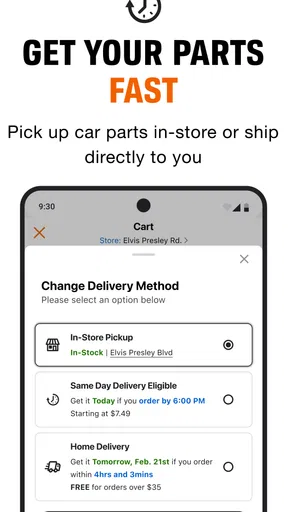
Another feature worth mentioning is the store locator. If you’re not keen on waiting for shipping, you can easily find the nearest AutoZone store. The app even allows you to check if the part you need is in stock at your local store. Plus, the option for in-store pickup is a real lifesaver when you're in a rush.
Overall Performance and Reliability
Throughout my time using the app, I didn’t encounter any major issues. It runs smoothly and loads quickly, which is crucial when you’re standing in your garage with oil-stained hands trying to figure out what to do next. The app also offers a nice little feature where it stores your past purchases and searches, making reordering a breeze.
Another thing I noticed is how the app keeps improving with updates. It's clear that the developers are keen on ironing out bugs and enhancing user experience, which is always reassuring.
Final Thoughts
So, would I recommend the AutoZone Auto Parts & Repair app? Absolutely! Whether you’re a seasoned car enthusiast or just someone who wants to keep their vehicle in tip-top shape, this app has something for everyone. It’s user-friendly, reliable, and packed with features that make car maintenance less of a chore. So go ahead and give it a whirl—your car (and your wallet) will thank you!
Privacy and Permissions
See what permissions an app requests and how it handles your data.
- Identity
- find accounts on the device
- Contacts
- find accounts on the device
- Location
- approximate location (network-based), precise location (GPS and network-based)
- Phone
- directly call phone numbers, read phone status and identity
- Photos/Media/Files
- read the contents of your USB storage, modify or delete the contents of your USB storage
- Storage
- read the contents of your USB storage, modify or delete the contents of your USB storage
- Camera
- take pictures and videos
- Wi-Fi connection information
- view Wi-Fi connections
- Device ID & call information
- read phone status and identity
- Other
- view network connections, full network access, run at startup, control vibration, prevent device from sleeping, read Google service configuration
Verdict
Strengths of AutoZone Auto Parts & Repair
- Extensive parts inventory available.
- User-friendly interface for easy navigation.
- Quick order tracking and updates.
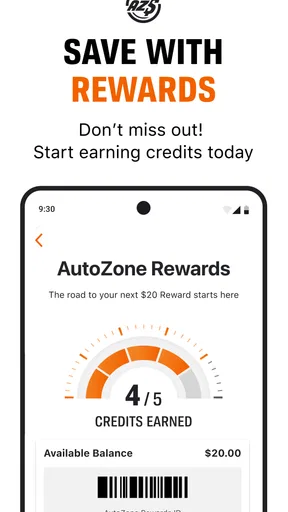
- Seamless integration with rewards program.
- Convenient in-app repair guides.
Limitations of AutoZone Auto Parts & Repair
- Limited payment options available.
- Some features require account setup.
- Occasional app crashes reported.
- Inconsistent search function results.
- Requires stable internet connection.
Other Releases by AutoZone, Inc.
View All
AutoZonePro Mobile
Auto & Vehicles4.5
Similar Picks in This Category
View All
Android Auto
Google LLC4.1

maxim — order a taxi & food
PT. SITO4.7

Штрафы ГИБДД: проверка с фото
Pays LLC – Штрафы ГИБДД4.7

Номерограм – проверка авто
Авто Ассист4.8

Дром Авто
Дром4.9

Frequently Asked Questions
What features does the AutoZone Auto Parts & Repair app offer?
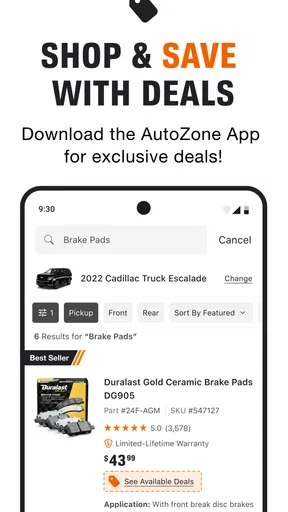
The AutoZone app provides a comprehensive platform for car enthusiasts and professionals alike. It offers features such as a parts locator, repair guides, and troubleshooting tips. Users can also access their AutoZone Rewards, check product availability, and receive notifications for exclusive deals and discounts.
Is the AutoZone app free to download and use?
Yes, the AutoZone Auto Parts & Repair app is free to download on both Android and iOS devices. While the app itself is free, users may incur costs when purchasing parts or services through the app. The app also offers free access to repair guides and other resources.
Can I use the AutoZone app to find specific car parts?
Absolutely! The AutoZone app includes a robust parts locator feature. Users can search for specific parts by entering their vehicle details, ensuring compatibility. The app also shows the availability of parts at nearby AutoZone stores and provides the option to order online for in-store pickup or home delivery.
How does the AutoZone Rewards program work through the app?
The AutoZone app integrates seamlessly with the AutoZone Rewards program. Users can sign up or log in to track their purchases and earn rewards. For every purchase, points are accumulated, which can be redeemed for discounts on future purchases. The app also sends notifications for exclusive member offers.
Is customer support available through the AutoZone app?
Yes, customer support is readily available through the AutoZone app. Users can access support options via the app, including live chat and a detailed FAQ section. The app also provides contact information for local stores, allowing users to reach out directly for assistance with their needs.
